Table of Contents
- What I Found in a Large Backend Codebase
- Validate Before the Transaction Starts
- Rows and Columns Are Not How the Database Reads Data
- Types of Pages on Disk
- Inside a Data Page: Header, Rows, and the Offset Array
- Heap Tables: Fast Writes, Painful Reads
- Why Scans Are Slow Without an Index
- Index Types
- B-Tree vs B+ Tree: How the Database Finds Your Row
- How Pages Live Inside Storage
- Why a Frequently Updated Column Should Not Be Your Clustered Key
- The Cost of Unnecessary Indexes
- My Recommendation
What I Found in a Large Backend Codebase
I recently spent some time reviewing a large backend codebase and found two common issues.
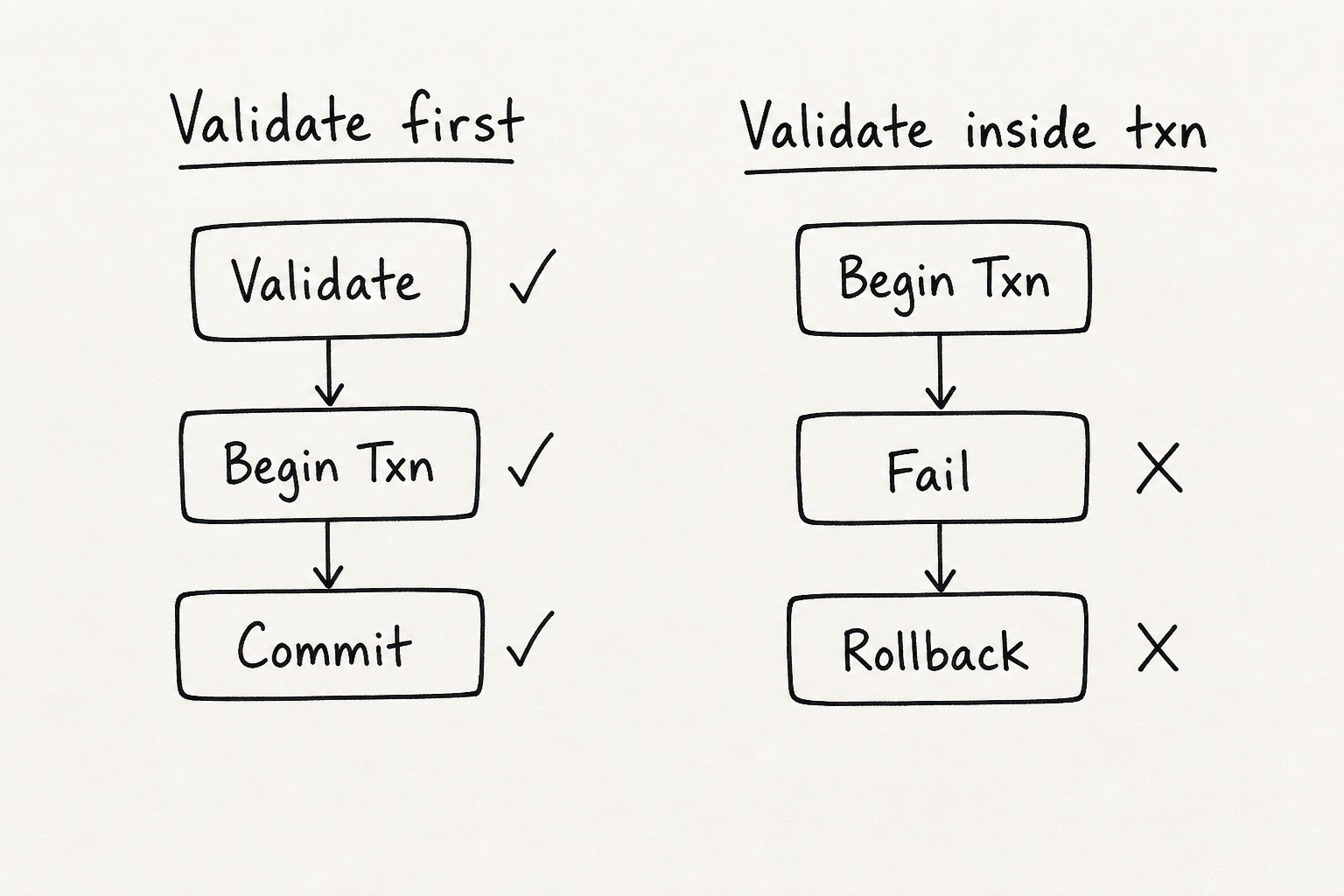
The first one was validation happening inside transactions. Null checks, amount checks, simple input checks, all placed after the transaction had already started. So when validation failed, SQL Server still had to do real work first (locks, log writes, rollback bookkeeping) and then undo it.
The second one was index sprawl. There were indexes on columns that almost never appeared in WHERE clauses, plus overlapping indexes that solved the same query shape. Reads got a little help, but writes paid the price on every INSERT, UPDATE, and DELETE.
That is usually where teams get trapped: we understand indexes conceptually, but not how data is actually read on disk. Once you see the storage layer, these mistakes become obvious.
Validate Before the Transaction Starts
When you open a transaction, SQL Server starts real work. Locks. Log records. Rollback info. If your validation fails after that, all of it gets thrown away.
In backend code, the same idea shows up when validation hides inside a service that already runs on a transaction.
Wrong way. The handler opens the transaction, but the edge-case check lives inside createARoleUserForMutation:
const data = await useTransaction(async (tx) =>
  roleUserService.createARoleUserForMutation(parsed.data, tx)
);

async function createARoleUserForMutation(data, tx) {
  const roleUser = await tx.insert(roleUsers).values({
    userId: data.userId,
    roleId: data.roleId,
  });

  if (!data.roleId) {
    throw new ValidationError('roleId is required');
  }

  return roleUser;
}
By the time roleId fails, the insert already ran inside the transaction. SQL Server did the work. Then it rolls back.
Better way. Validate before the transaction. Keep the service focused on database work only:
if (!parsed.data.roleId) {
  throw new ValidationError('roleId is required');
}

const data = await useTransaction(async (tx) =>
  roleUserService.createARoleUserForMutation(parsed.data, tx)
);

async function createARoleUserForMutation(data, tx) {
  return tx.insert(roleUsers).values({
    userId: data.userId,
    roleId: data.roleId,
  });
}
Same rule in SQL:
IF @amount <= 0 THROW 50001, 'Invalid amount', 1;
BEGIN TRANSACTION;
INSERT INTO orders (amount) VALUES (@amount);
COMMIT;
Warning: Some checks belong inside a transaction. Preventing double-charge, checking a row version under concurrency, that kind of thing. Simple input validation should happen before you open the transaction.
Rows and Columns Are Not How the Database Reads Data
We think in rows and columns. Clean tables. Easy to read.
But SQL Server does not read your table like a spreadsheet. It reads pages from data files on disk. A page is a fixed chunk of storage. In SQL Server, that chunk is 8 KB. That is also the smallest unit of I/O. The engine loads a whole page, finds the row inside, and moves on.
When you run a query, it walks slots inside pages and follows pointers from index pages to data pages. Rows and columns are how we write SQL. Pages are how the engine reads data.
Note: This post focuses on SQL Server. Other databases work in a similar way, but page size and details can differ.
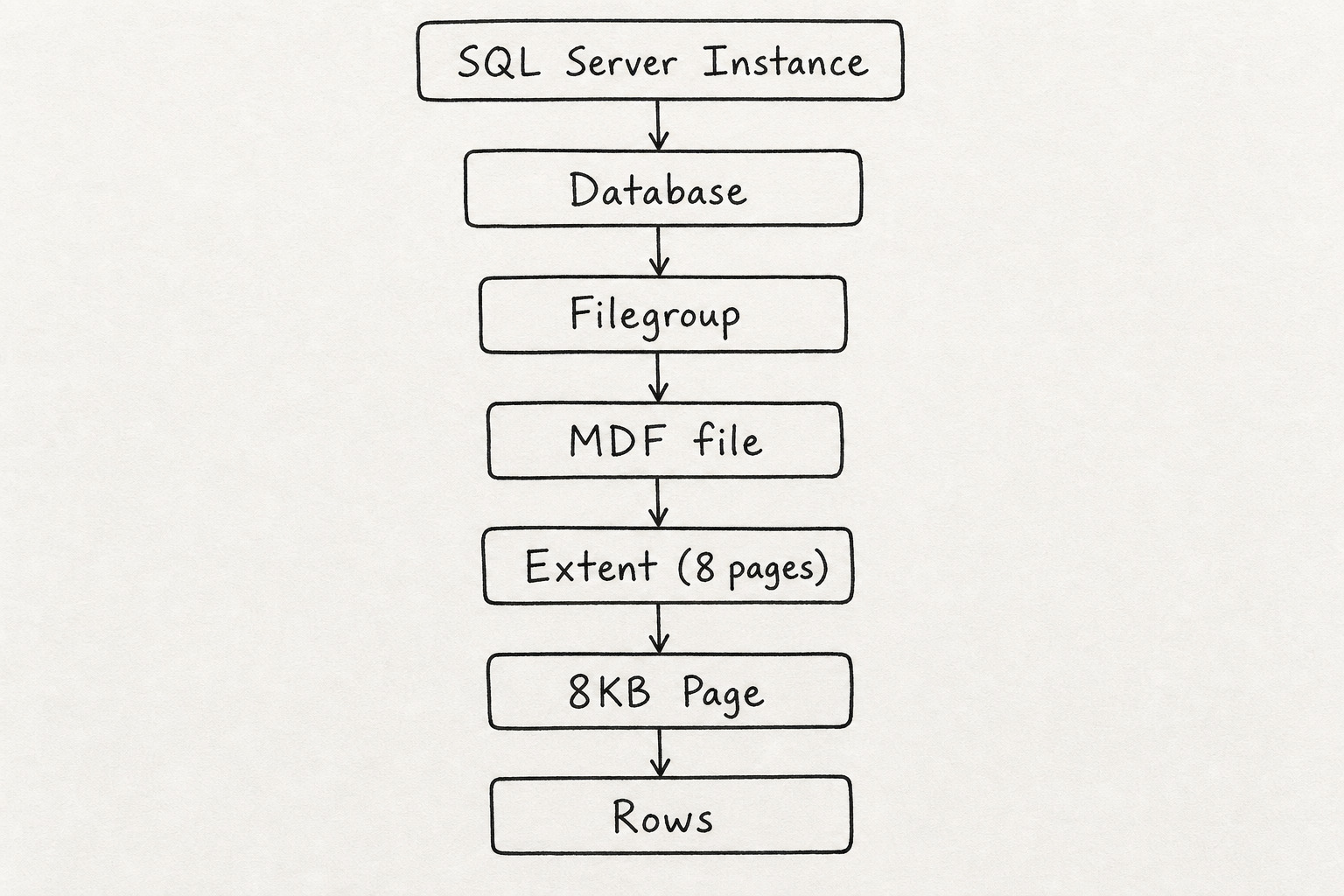
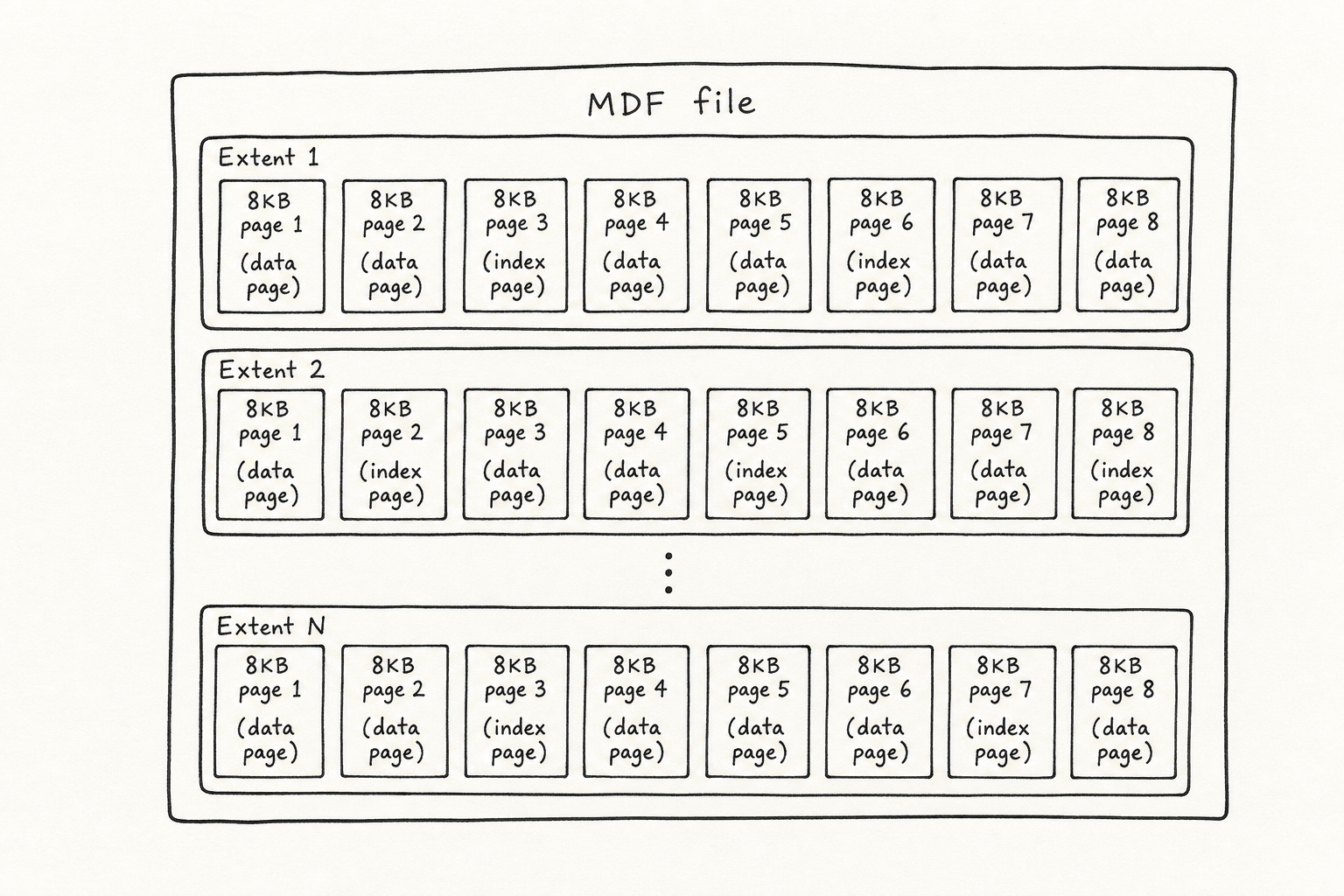
Storage stacks up: instance, database, filegroup, .mdf or .ndf file, extent (8 pages), then a single 8 KB page with rows inside.
Types of Pages on Disk
Not every page stores the same thing.
Data page stores table rows.
Index page stores B+ tree index nodes.
LOB / Row-overflow page stores large values or row pieces that do not fit inline on a data page.
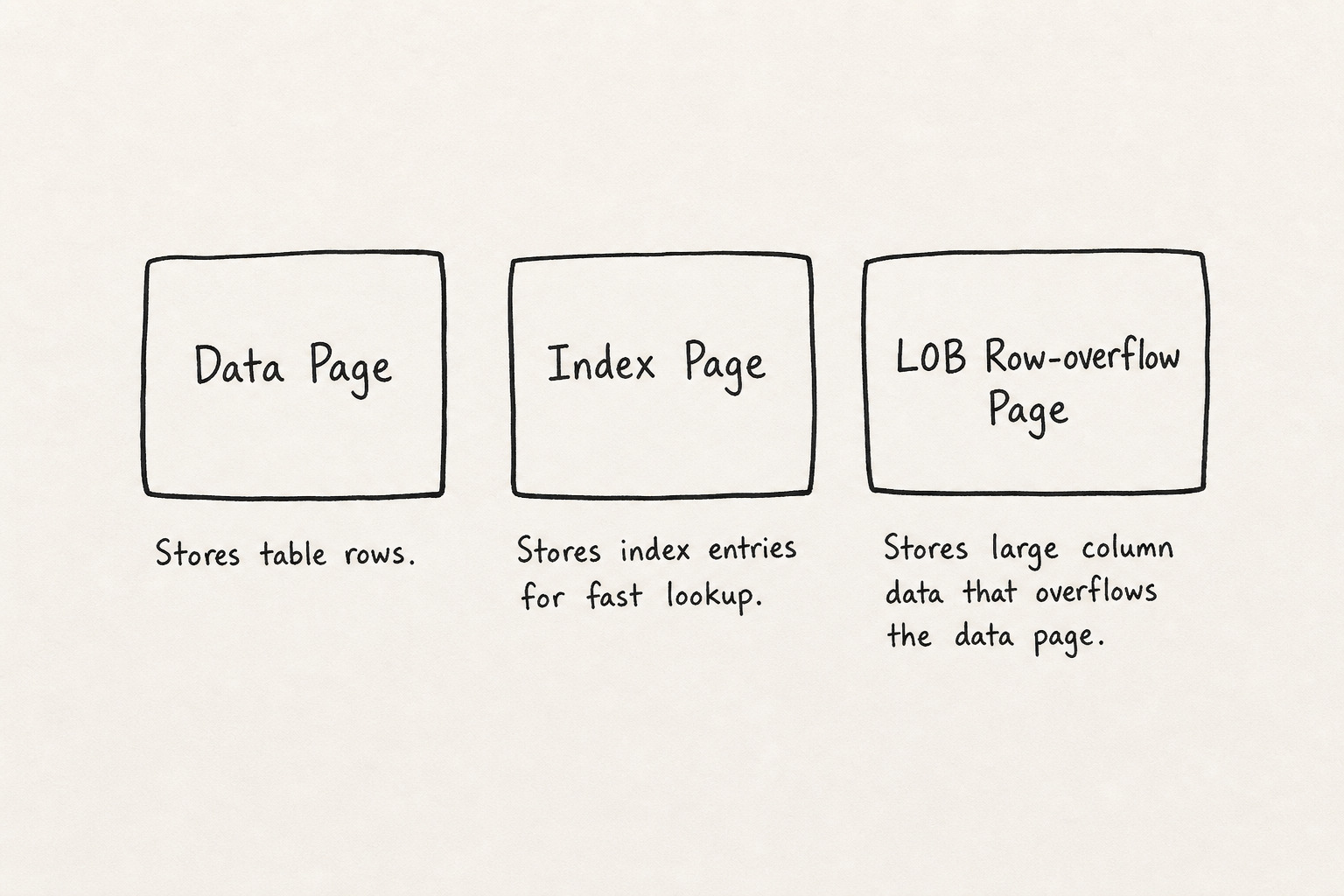
When a row is too wide for one data page, part of it moves to a row-overflow page. Big text or binary values can go to LOB pages. Your table still looks flat in SQL. On disk, one row can touch multiple pages.
Inside a Data Page: Header, Rows, and the Offset Array
A data page has three main parts.
Page header sits at the top. Page type, free space, object ID, row count, checksum. The engine reads this first.
Row data is stored from the bottom of the page upward. As you insert, rows stack from the bottom.
Slot array (offset array) lives at the end of the page. Each slot is a 2-byte offset pointing to where a row starts. To read row 3, the engine reads slot 3 and jumps there. No byte-by-byte scan from the top.
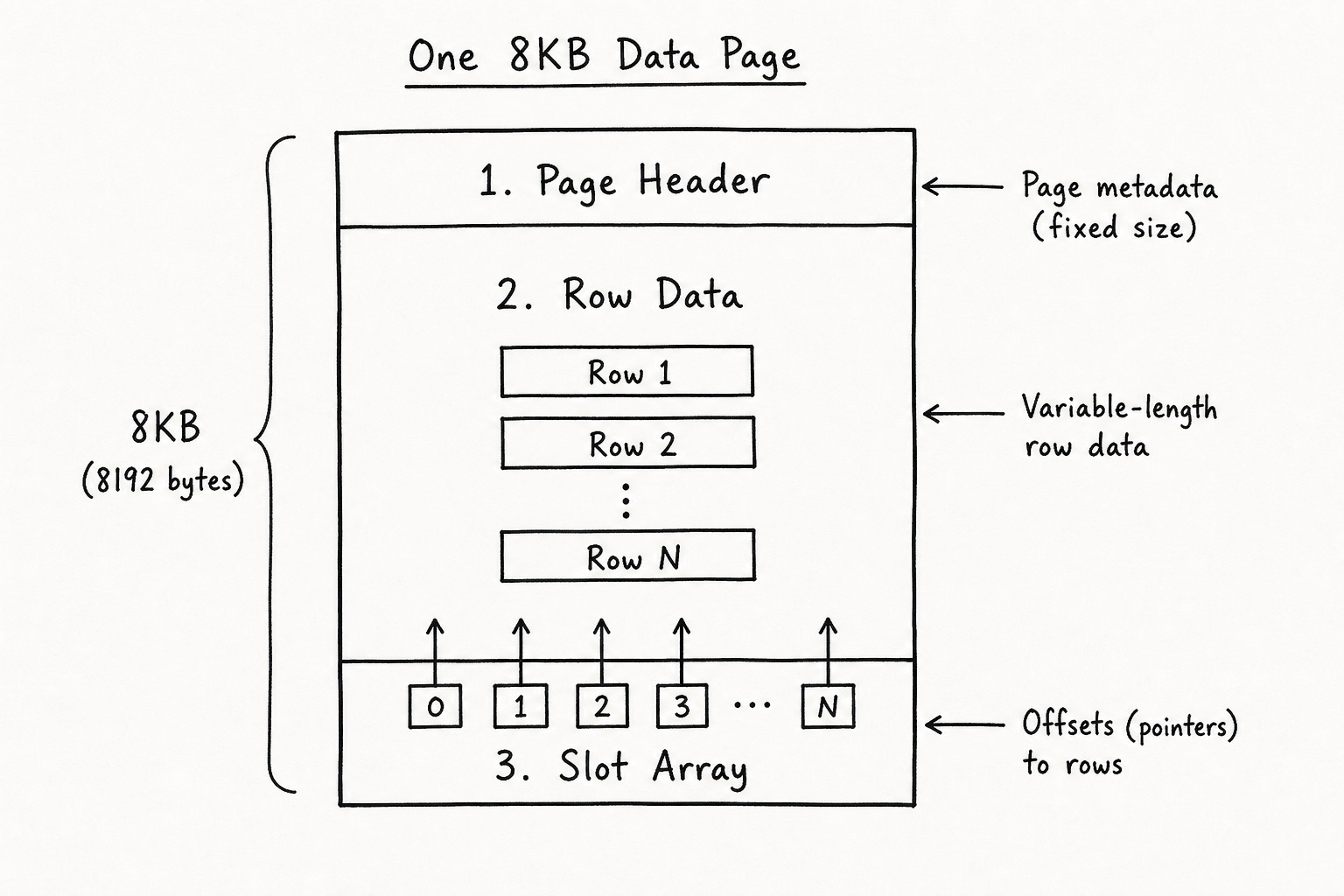
Key idea: The engine loads a page, reads the slot array, and follows the offset to the row bytes.
Heap Tables: Fast Writes, Painful Reads
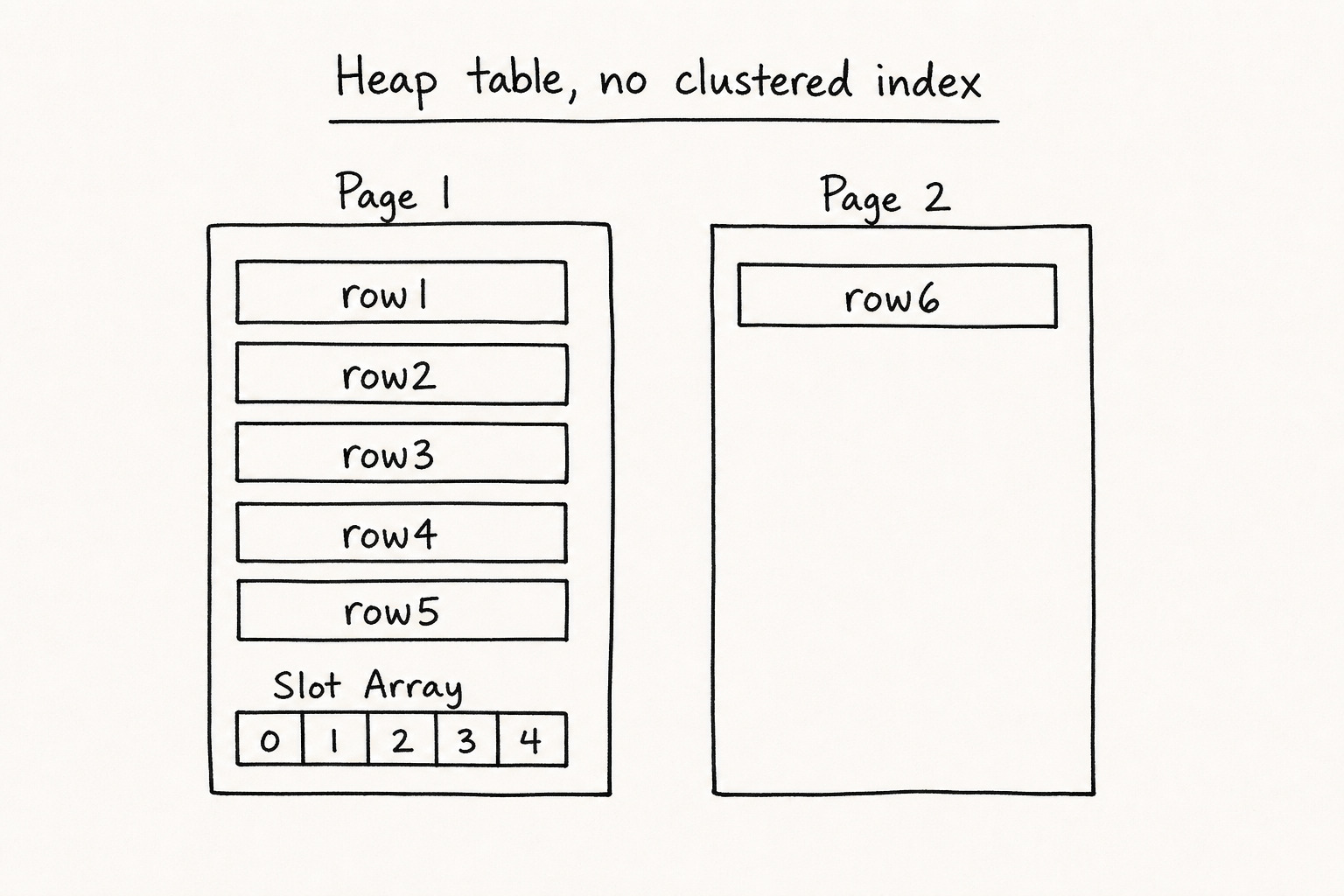
When you create a table without a clustered index, SQL Server stores it as a heap. Rows go wherever there is free space. No sorting. Just insertion order.
Say one data page fits about 5 rows. You insert 6:
CREATE TABLE users_heap (id INT, email NVARCHAR(255));
INSERT INTO users_heap VALUES
(1,'a@x.com'), (2,'b@x.com'), (3,'c@x.com'),
(4,'d@x.com'), (5,'e@x.com'), (6,'f@x.com');
Rows 1 to 5 land on page 1. Row 6 goes to page 2. Data stays unsorted. Fine for inserts. Bad for lookups.
Key idea: A heap has no clustered index. Writes are fast. Reads are slow because nothing is ordered.
Why Scans Are Slow Without an Index
Now you search for one email:
SELECT * FROM users_heap WHERE email = 'a@x.com';SQL Server has no idea where that email lives. It loads every data page, walks every slot, and checks every row until it finds a match or runs out of rows. That is a table scan.
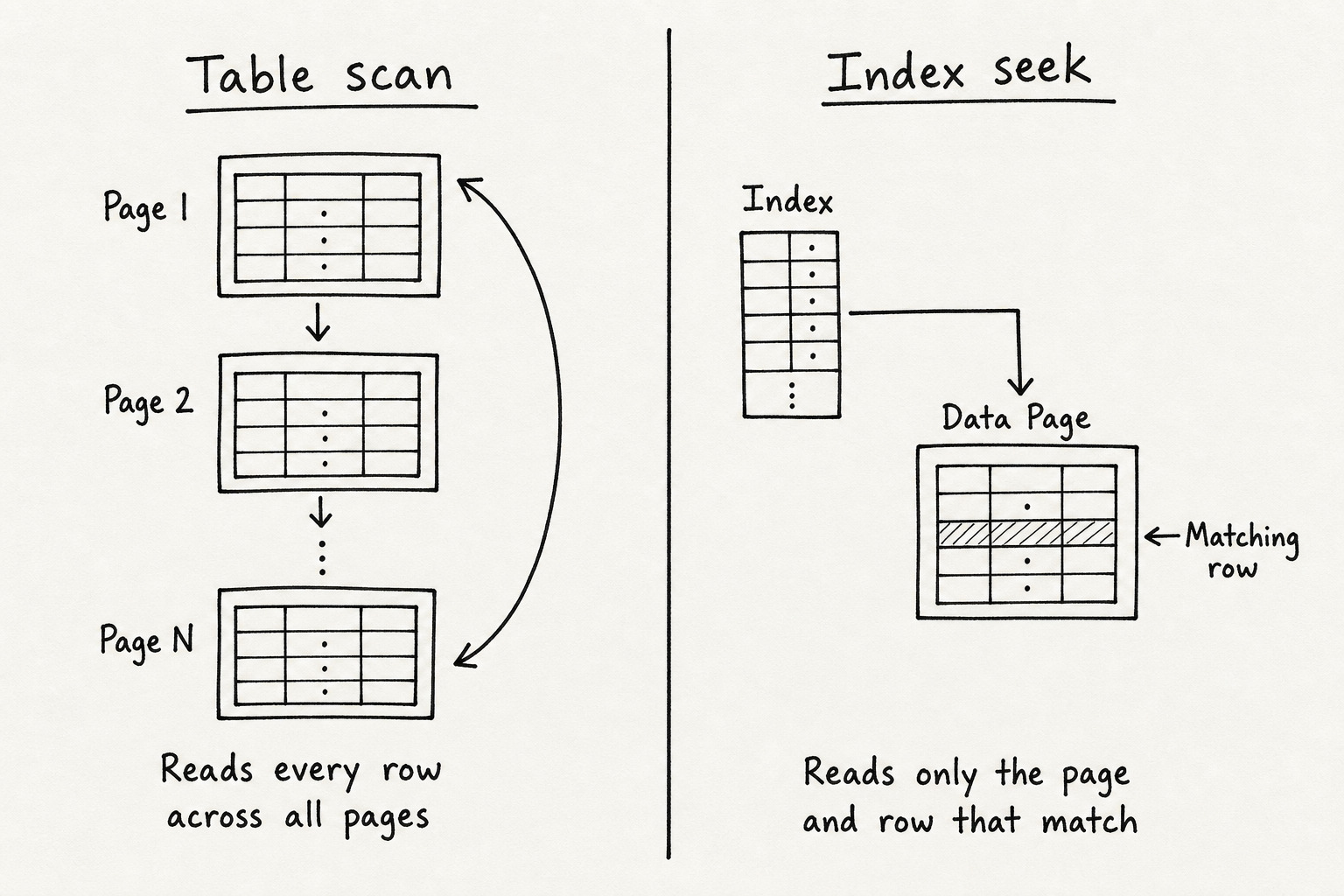
This is why indexes exist. To give the engine a shortcut to the right page and row.
Index Types
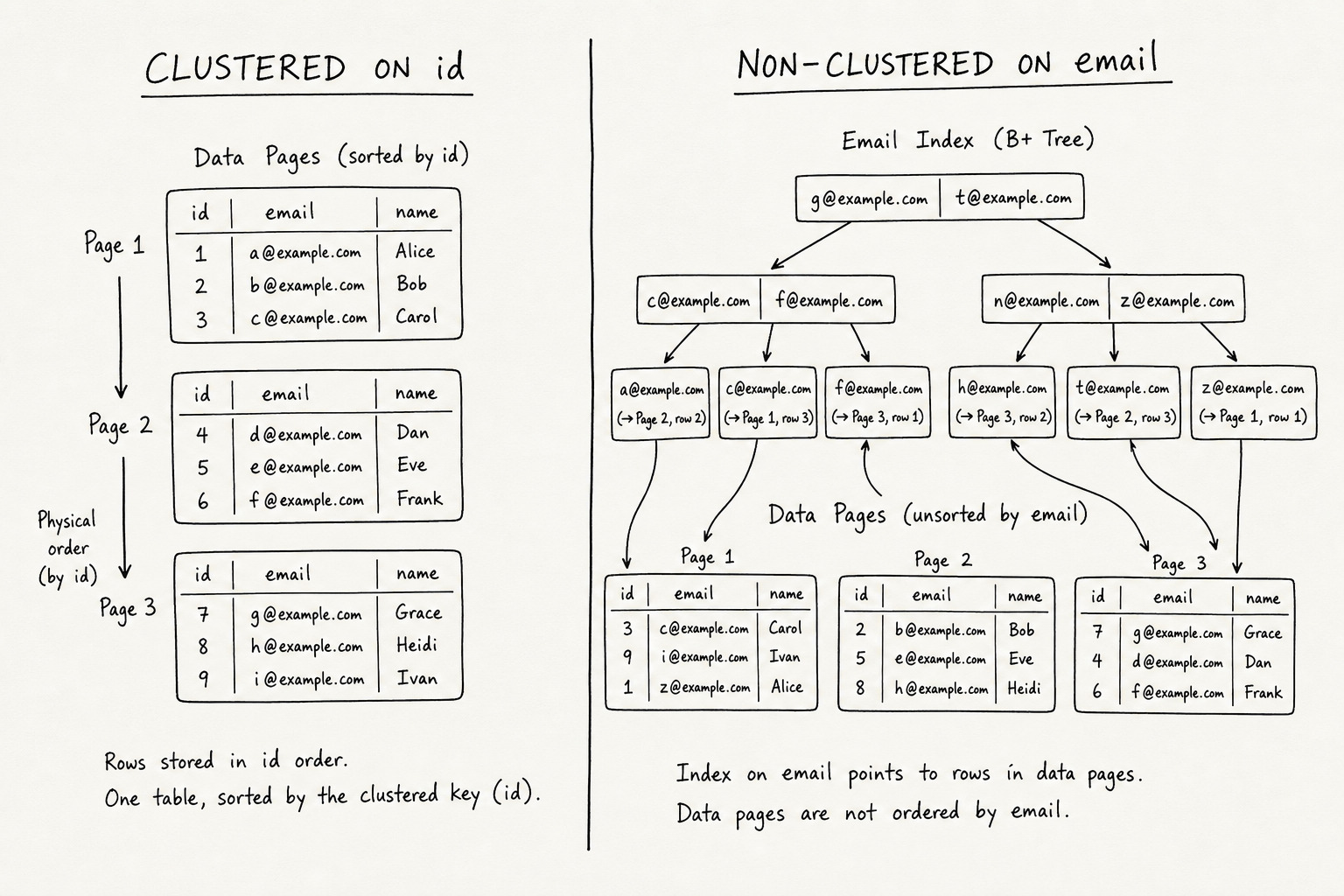
Clustered index sets the physical sort order of rows on data pages. The leaf level is the table data. One per table.
Non-clustered index is a separate B+ tree. The leaf holds the key plus a pointer back to the row. Many allowed.
Composite index covers multiple columns. Works when your query filters on the leftmost column first. (status, created_at) helps WHERE status = 'open'. It does not help WHERE created_at > '2026-01-01' on its own.
Storage index is about how SQL Server stores the data on disk.
- Rowstore is the default. Full rows on data pages. Good for normal app work.
- Columnstore stores data column by column, compressed in batches. Good for reporting and analytics.
Function index is about what the index does, not how rows sit on pages.
- Unique blocks duplicate key values.
- Filtered only indexes rows that match a
WHEREclause.
CREATE CLUSTERED INDEX IX_users_id ON users (id);
CREATE NONCLUSTERED INDEX IX_users_email ON users (email);
CREATE INDEX IX_orders_status_date ON orders (status, created_at);

CREATE NONCLUSTERED COLUMNSTORE INDEX IX_sales_cs
ON sales (region, product_id, amount, sale_date);

CREATE UNIQUE INDEX IX_users_email_uq ON users (email);
CREATE INDEX IX_orders_active ON orders (created_at) WHERE status = 'active';
Most apps live on rowstore clustered and non-clustered indexes. Columnstore, unique, and filtered help when the scenario calls for them.
B-Tree vs B+ Tree: How the Database Finds Your Row
SQL Server rowstore indexes use a B+ tree. Same family as B-tree, different layout.
B-Tree: keys can sit in internal nodes and leaf nodes. Data can live at any level.
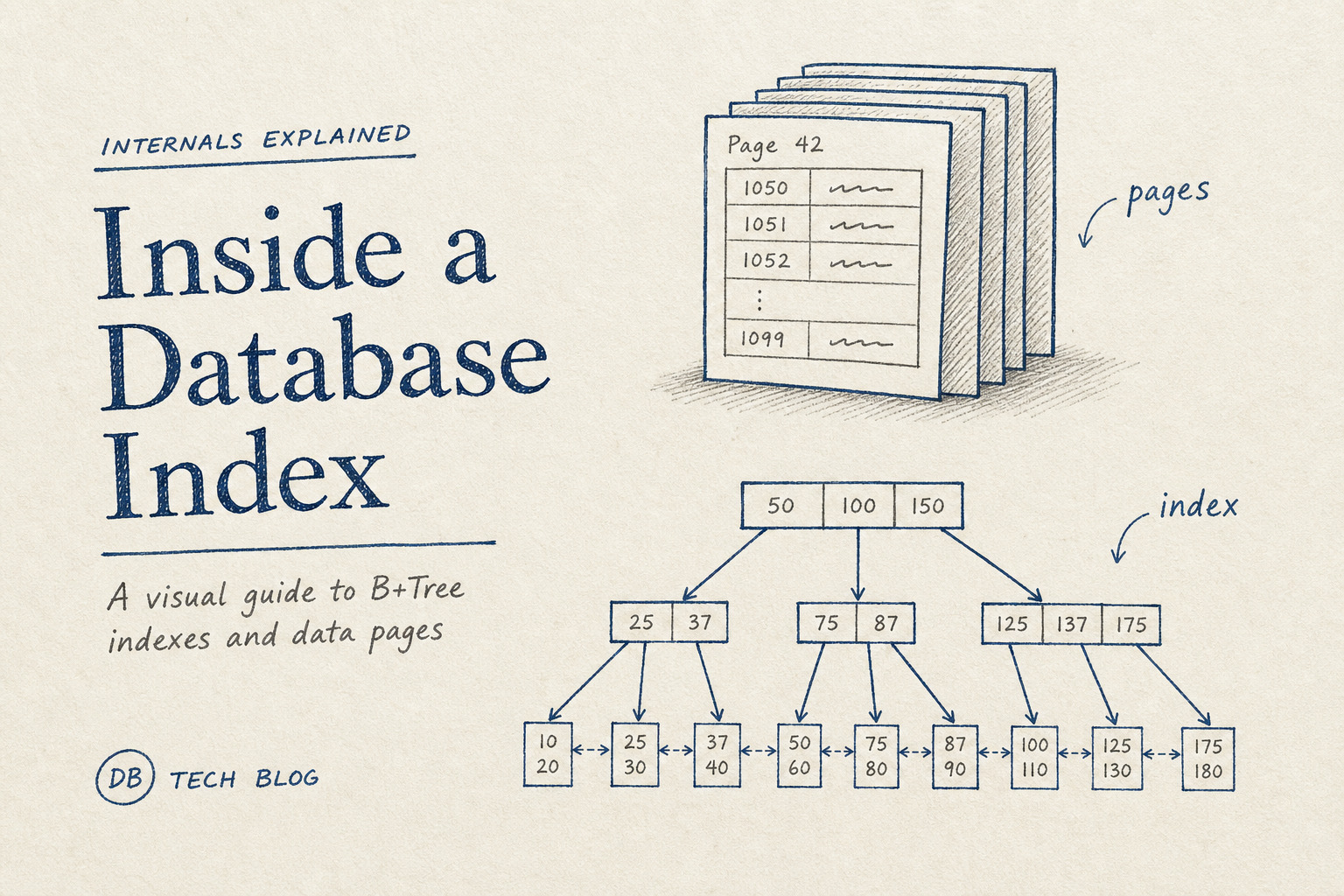
B+ Tree: internal nodes only route you. All keys and row pointers sit in the leaf level. Leaves link to each other, so range queries can walk forward without going back up the tree.
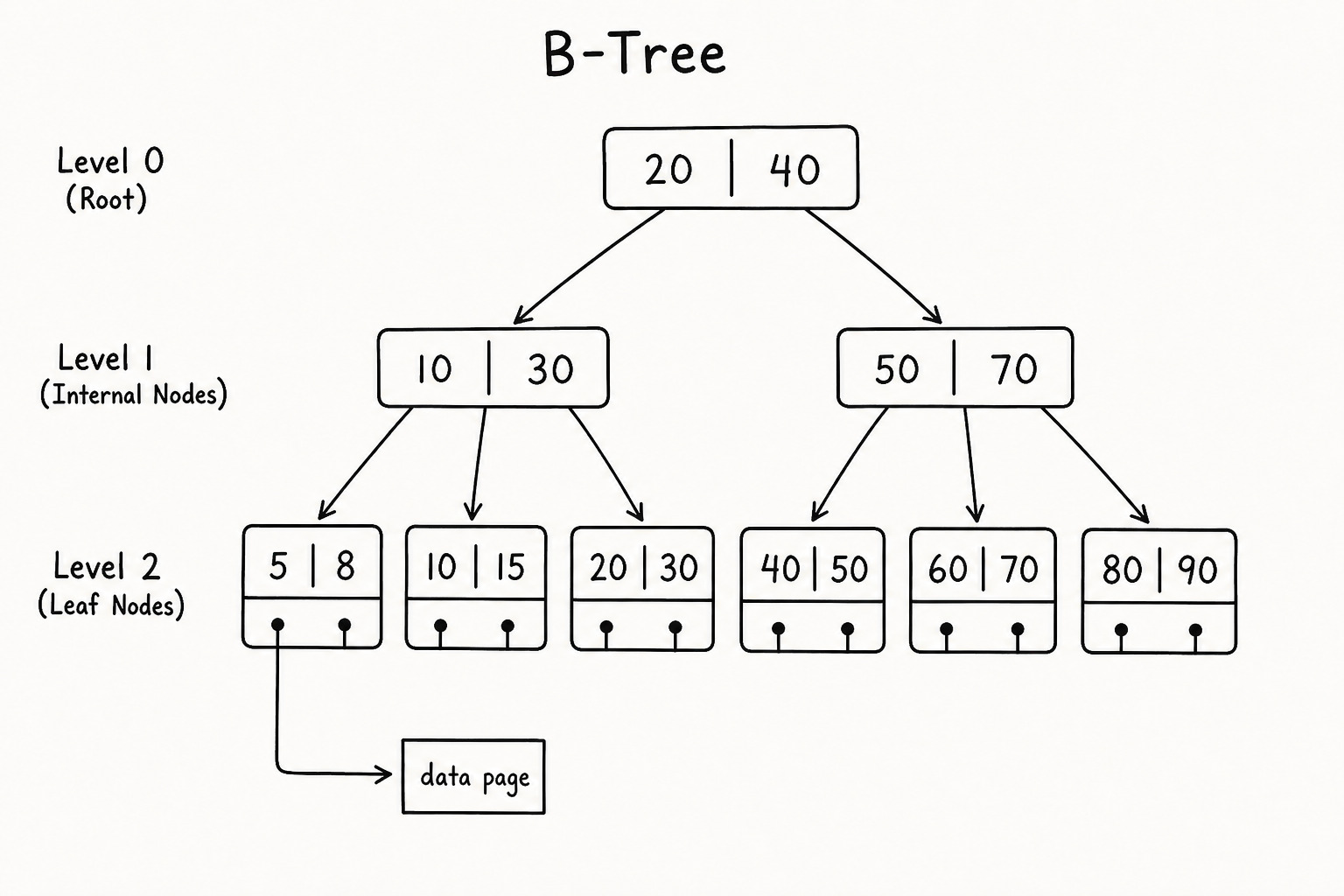
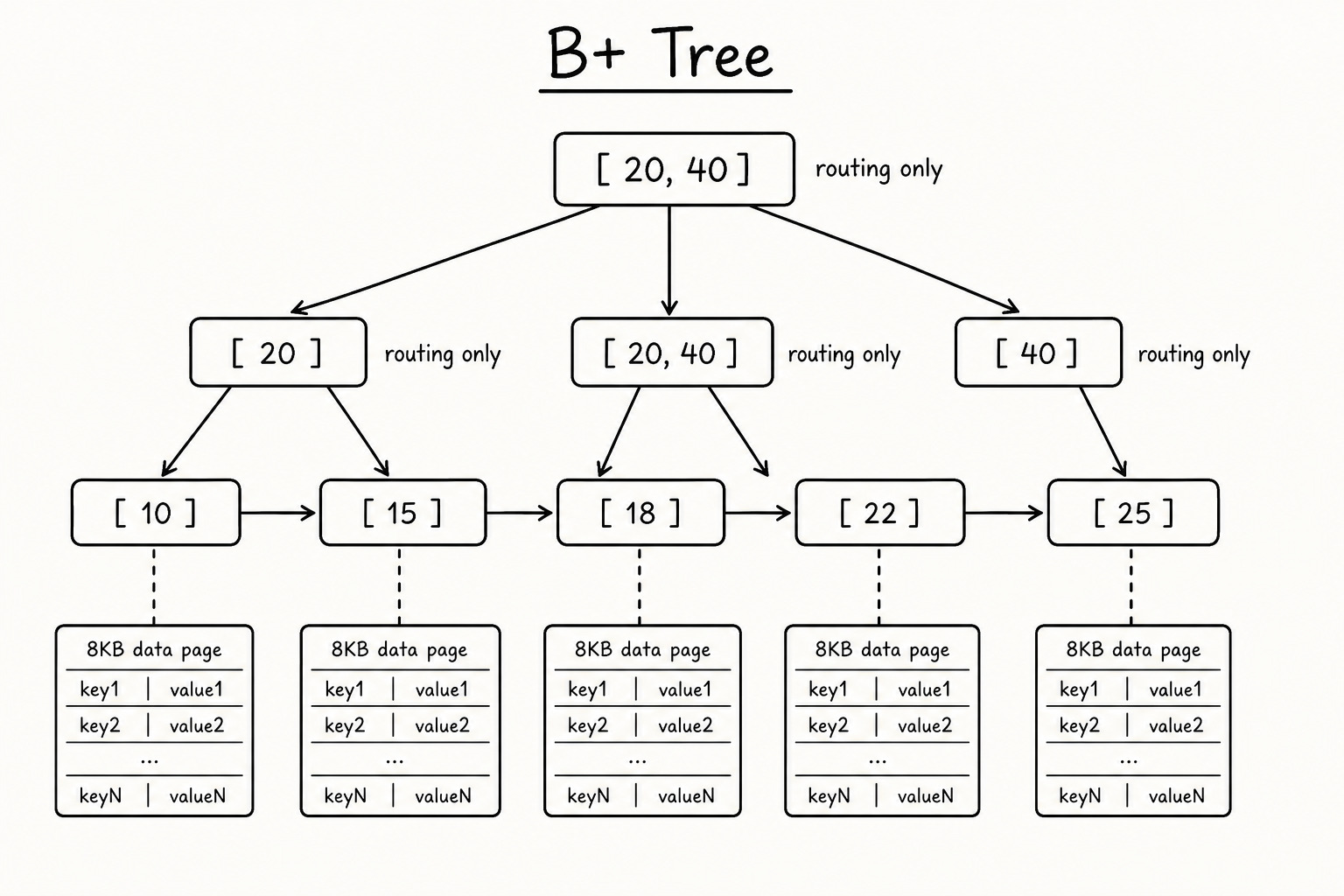
When you run WHERE id = 42, the engine walks the B+ tree to a leaf, reads the pointer, and loads one data page. For BETWEEN, ORDER BY, and pagination, the linked leaf chain helps a lot.
How Pages Live Inside Storage
Inside your .mdf and .ndf files, pages are grouped into extents of 8 contiguous 8 KB pages. Data pages and index pages live in the same filegroup. When you add an index, SQL Server allocates index pages in the same storage layout. That is why extra indexes cost disk space and slow down writes.
Why a Frequently Updated Column Should Not Be Your Clustered Key
The clustered key is the physical row order. Update that column and the row may move to a new spot. Old slot removed. New location written. Every non-clustered index updated. Pages may split.
If login_count goes up on every request and it is your clustered key, you keep moving rows around. Fragmentation grows. Writes get heavier.
CREATE CLUSTERED INDEX IX_users_login_count ON users (login_count);

CREATE CLUSTERED INDEX IX_users_id ON users (id);
CREATE INDEX IX_login ON users (login_count);
The first one is a bad fit for a hot column. The second pair is what you want.
The Cost of Unnecessary Indexes
Every index must be maintained on every INSERT, UPDATE, and DELETE. More pages. More log records. More work for the optimizer.
CREATE INDEX IX_status ON orders (status);If you already have (status, created_at), that index on status alone is redundant. The composite index already covers it. The extra one just adds write overhead.
My Recommendation
Validate simple rules before opening a transaction. Do not bury input checks inside service methods that already receive tx.
Use a stable clustered key. Primary key or IDENTITY. Not something that changes every request.
Add non-clustered indexes for real query patterns. Check execution plans first.
Use composite indexes with INCLUDE instead of many overlapping ones.
Pick rowstore for normal CRUD. Columnstore for heavy analytics. Unique when duplicates must fail. Filtered when queries only touch part of the table.
Review indexes regularly and drop what you do not use.
Once you see that the engine reads pages, not rows, indexing becomes something you can reason about.